
Introduction
SFC Locations
Supported Models
SFC Usage Plans
Purchase / Top Up
SFC Usage Plans Quota
FAQs

SpeedFusion Connect

Why Incorporate SpeedFusion Connect into Your Connectivity?

Global Coverage

Leverage the global reach of public clouds to ensure that you get the fastest response time and the most reliable connection.

SpeedFusion Technology

Enjoy Bandwidth Bonding, Hot Failover, and Smoothing from any compatible router.

Minimal Infrastructure Needed

No need to invest in core hardware, setting up, or even maintenance.

Reduce Network Costs

Combine multiple commodity links to create a high-bandwidth tunnel without upgrading to costly dedicated connections.

SpeedFusion Connect Locations
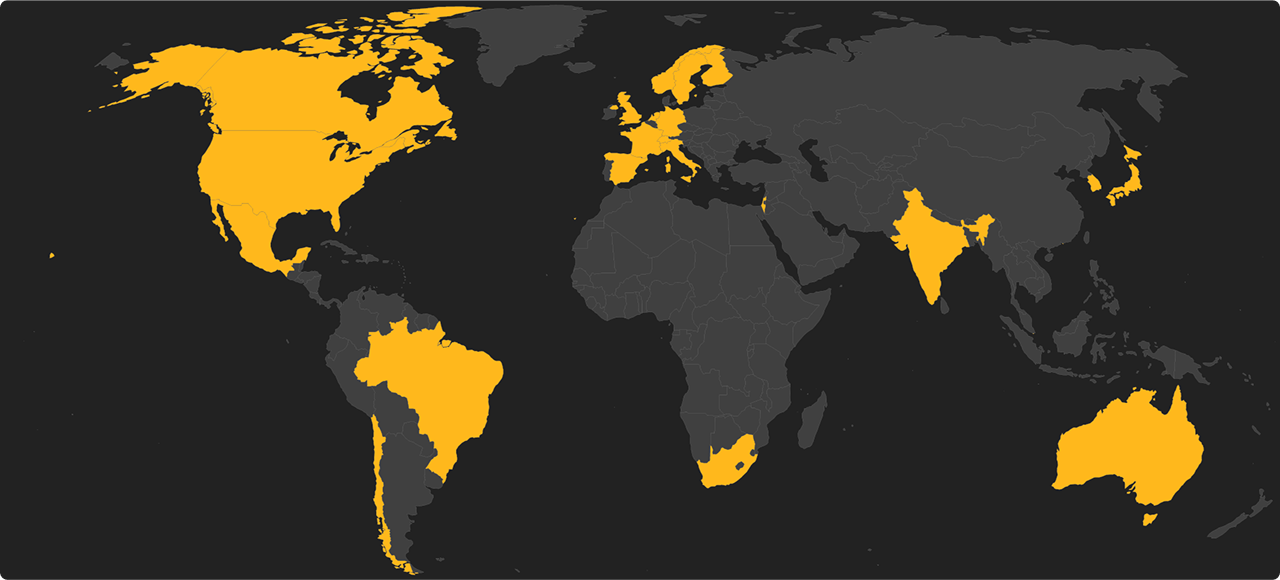
SpeedFusion Connect Locations

Australia

Melbourne

Sydney

Brazil

São Paulo

Canada

Montreal

Toronto

Vancouver

Chile

Santiago

Finland

Helsinki

France

Paris

Germany

Frankfurt

Hong Kong

Hong Kong

India

Bangalore

Israel

Tel Aviv

Italy

Milan

Japan

Osaka

Tokyo

Mexico

Mexico City

Netherlands

Amsterdam

Norway

Oslo

Poland

Warsaw

Singapore

Singapore

South Africa

Johannesburg

South Korea

Seoul

Spain

Madrid

Sweden

Stockholm

Switzerland

Zürich

United Kingdom

London

United States

Ashburn

Atlanta

Chicago

Dallas

Kansas City

Los Angeles

Miami

New York

Phoenix

San Francisco

San Jose

Seattle

Supported Models 1

1. Require firmware 8.1.0 or above.

Enterprise Routers

Balance Series

Balance 20

Balance 20X

Balance 30 LTE (HW3+)

Balance 30 Pro

Balance 210 (HW2+)

Balance 305 (HW2+)

Balance 310 (HW5)

Balance 310 5G

Balance 310 Fiber 5G

Balance 310X

Balance 380 (HW6)

Balance 380X

Balance 580 (HW2+)

Balance 580X

Balance 710 (HW3+)

Balance 1350 (HW2+)

Balance 1350 EC

Balance 2500

Balance 2500 EC

Balance 5000 EC (40G)

Balance 5000 EC (100G)

Balance One

Balance One Core

Balance Two

SDX Series

SDX

SDX Pro

EPX Series

EPX

Enterprise Mobility

HD Series

HD2

HD2 IP67

HD2 MBX

HD2 MBX 5G

HD2 Mini

HD4

HD4 IP67

HD4 MBX

HD4 MBX 5G

Dome Series

Dome Pro Duo

Dome Pro LR

HD1 Dome

HD1 Dome Pro

HD2 Dome

HD2 Dome Pro

MBX Series

MBX Mini

PDX Series

PDX

Mobile Routers

BR Series

BR1 Classic (HW2+)

BR1 ENT

BR1 M2M

BR1 IP55 (HW2+)

BR1 IP67

BR1 Mini

BR1 Mini 5G

BR1 Mini 5G (Wi-Fi)

BR1 Mini Core

BR1 Mini M2M

BR1 MK2 (HW3+)

BR1 Pro (CAT-20)

BR1 Pro (HW2+)

BR1 Pro 5G

BR2 (HW2+)

BR2 Micro

BR2 Pro (HW4+)

Transit Series

Transit

Transit 5G

Transit Core

Transit Duo

Transit Duo Pro

Transit Mini

Transit Pro

Transit Pro E

UBR Series

UBR LTE

UBR Plus

Enterprise Branch Routers

B One Series

B One

B One 5G

B One Plus

Others

MAX Orbit Series

MAX Orbit 2

MAX Orbit 4

MAX Orbit 8

SpeedFusion Engine Series

SFE

SFE CAM

Surf Series

Surf SOHO (HW2+)

Other Models

SFC Relay

SpeedFusion Connect Usage Plans

Purchase / Top Up 2

2. All pricing applies to US region only, other regions may vary. Please also refer to our SFC Usage Plan & Peplink eSIM Data Plan Terms and Conditions.

SpeedFusion Connect Usage Plan Quota

All Peplink routers with active CarePlan subscriptions receive an annual SFC usage quota. The quota amount depends on the tier of the routers. All tier plans can achieve speeds of up to 200 Mbps 3. After exceeding the SFC usage limit, you can still use the service at a lower speed of 10 Mbps 4.

Usage per Year

Models

500 GB

Balance Series

Balance 20, Balance 20X, Balance 30 LTE (HW3+), Balance 30 Pro, Balance One, Balance One Core, Balance Two

BR & Transit & UBR Series

BR1 Classic (HW2+), BR1 ENT, BR1 IP55 (HW2+), BR1 IP67, BR1 M2M, BR1 Mini, BR1 Mini 5G, BR1 Mini 5G (Wi-Fi), BR1 Mini Core, BR1 Mini M2M, BR1 MK2 (HW3+), BR1 Pro (HW2+), BR2 (HW2+), BR2 Micro, Transit, Transit Mini, UBR LTE, UBR Plus

B One Series

B One, B One 5G, B One Plus

MAX Orbit Series

MAX Orbit 2

Surf Series

Surf SOHO (HW2+)

Others

SFC Relay, SFE

1TB

Balance Series

Balance 210 (HW2+), Balance 305 (HW2+), Balance 310 (HW5), Balance 310 5G, Balance 310 Fiber 5G, Balance 310X, Balance 380 (HW6), Balance 380X, Balance 580 (HW2+), Balance 580X

HD Series

HD2, HD2 IP67, HD2 Mini

Dome Series

Dome Pro Duo, Dome Pro LR, HD1 Dome, HD1 Dome Pro, HD2 Dome, HD2 Dome Pro

BR & Transit & UBR Series

BR1 Pro (CAT-20), BR1 Pro 5G, BR2 Pro (HW4+), Transit 5G, Transit Core, Transit Duo, Transit Duo Pro, Transit Pro, Transit Pro E

MAX Orbit Series

MAX Orbit 4, MAX Orbit 8

Others

SFE CAM

2.5TB

Balance Series

Balance 710 (HW3+), Balance 1350 (HW2+), Balance 1350 EC, Balance 2500, Balance 2500 EC, Balance 5000 EC (40G), Balance 5000 EC (100G)

X Series

EPX, HD2 MBX, HD2 MBX 5G, HD4 MBX, HD4 MBX 5G, MBX Mini, PDX, SDX, SDX Pro

HD Series

HD4, HD4 IP67

3. The regular plans can go up to speed of 200Mbps. If you prefer higher performance, subscribe unlimited SFC Usage Plan (SKU: SFC-CLD-U-1M or SFC-CLD-U-1Y) which allows for speed of up to 400Mbps.
4. Capped the speed at 10Mbps to ensure applications like remote desktops, Google Meet, MS teams, and Zoom can run smoothly while preventing extreme abuse of the service.

FAQs

Q1. What is SpeedFusion Connect (previously known as SpeedFusion Cloud)?
A.
SpeedFusion Connect is Peplink’s infrastructure that provides access to a global network of SpeedFusion endpoints and technology without requiring additional hardware.
Q2. Can I purchase one SpeedFusion Connect plan and use it across multiple Peplink devices?
A.
No, each SpeedFusion Connect plan is attached to a single device’s serial number. Each device must have its own plan in order to utilize SpeedFusion Connect.
Q3. How do I activate SpeedFusion Connect allowance that’s included with my Care plan?
A.
All Care plans now include SpeedFusion Connect. This data allowance will automatically starts and ends with your warranty. No activation is required.
Q4. Does SpeedFusion Connect count towards my SpeedFusion peer limit?
A.
No, it does not.
Q5. My plan has expired, but I still have usage left. Will it roll over?
A.
Any remaining usage from expired plans will not be carried forward.
Q6. Can I track and monitor my SpeedFusion Connect usage?
A.
Yes, you can keep track of your usage via your router's WebUI dashboard.
Q7. How are SpeedFusion endpoints allocated?
A.
You can either manually choose your endpoint or automatically be assigned an endpoint is available. Click to learn more here.
Q8. How do I ensure the application that I want to protect uses SpeedFusion Connect?
A.
You can use an outbound policy to ensure that traffic from a specific application goes through SpeedFusion Connect. Define your source traffic as “any” and select your application under “protocol”. Select “enforced” as your algorithm, and finally, select SpeedFusion Connect as the enforced connection.
Q9. If I purchase multiple plans will the validity of the plans accumulate?
A.
The maximum validity is 3 years. For example, If you buy 2x SFC-CLD-F plans at the same time, each with a 3-year validity, the maximum validity period will still be 3 years.
Q10. I have activated “Auto-Renewal” in eStore. When will my subscription Auto-Renew?
A.
By default, the auto-renewal is triggered 7 days prior to expiry or 10% data remaining, whichever comes first. Click to learn more here.
Q11. Does utilizing SpeedFusion Connect require special firmware?
A.
Yes, all compatible models are required to have firmware version 8.1.0 or higher to utilize this service.

Still need help? Submit your question to our Forum here.

Contact Us